Content Credentials are signed records attached to an image, video, audio file or document that say where it came from and what was done to it, such as which camera captured it, which app edited it or whether an AI tool generated it. They follow an open technical standard from the Coalition for Content Provenance and Authenticity (C2PA). A credential can show that a record is intact and who signed it. It cannot tell you whether the picture shows the truth.
What a credential contains
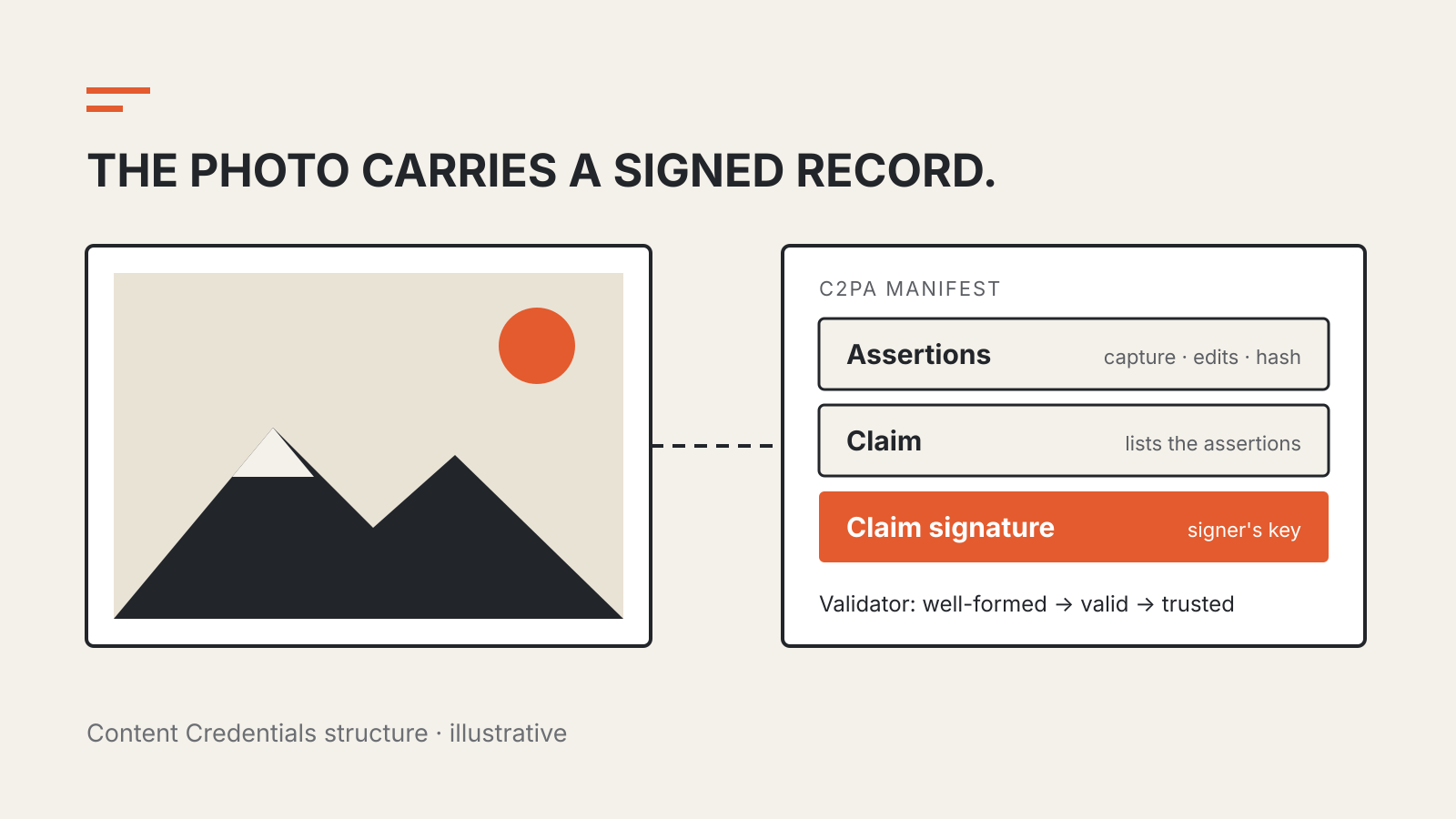
The C2PA technical specification, now at version 2.5 from October 2026, builds each record from three parts:
- Assertions: individual statements about the file, such as capture device details, edit actions, a thumbnail, or a cryptographic hash of the content.
- A claim: a structure that lists those assertions and the information that ties them to the file.
- A claim signature: a digital signature over the claim, made with the signer’s private key.
Together these form a C2PA Manifest. A file can carry several manifests, one for each step in its history, and the specification calls the whole set the asset’s Content Credential. When an image is cropped in an editor that supports the standard, the editor can add a new manifest that refers back to the earlier one as an ingredient.
The same structure records AI generation. The specification’s example: when a generative AI model produces a video from a text prompt, the manifest’s actions assertion starts with a “created” action whose digital source type is IPTC’s trainedAlgorithmicMedia, the code for media made by a trained model.
Signed, valid and trusted are different results
A tool that checks a credential is called a validator, and the specification lets it reach three increasingly strong conclusions about a manifest:
| Result | What the validator has confirmed |
|---|---|
| Well-formed | The manifest follows the specification’s structural rules |
| Valid | It is well-formed, has not been modified since signing, its signature checks out and the signer’s certificate was not revoked |
| Trusted | It is valid, and the signing certificate is accepted by the validator’s trust list |
Separately, the file itself counts as valid only when the content covered by the manifest’s hash has not changed since the manifest was produced and the manifest is valid or trusted.
The specification is explicit about its limits. It says C2PA specifications “DO NOT provide value judgements about whether a given set of provenance data is ‘good’ or ‘bad’”, only whether the statements can be tied to the file, are correctly formed and are free from tampering. A trusted credential tells you who vouched for a record. Whether to believe that party is still your decision.
What happens when the credential is stripped
A credential travels with the file, and the specification itself plans for the case where a manifest has been removed. A missing credential therefore proves nothing about where a file came from.
The specification offers a partial remedy through two kinds of binding. A hard binding is a cryptographic hash that matches only the exact file. A soft binding is a fingerprint or an invisible watermark computed from the content itself, so it can still match a resized or re-encoded copy. If the manifest has been removed but a copy is kept in a provenance store elsewhere, the specification says a soft binding can reconnect the file to it. That only works when the creator added a soft binding and someone stored the manifest.
How to check a file yourself
- Inspect the file. The Content Authenticity Initiative’s Verify tool accepts common image, video, audio and PDF formats and shows any credentials and edit history it finds. The tool itself warns that Content Credentials “are still rolling out”, so the file you check may have nothing to show.
- Read who signed it. A camera maker, news organization or AI service signing a record are different claims. Check the signer before the summary.
- Treat absence as unknown. No credential means no evidence either way, not proof of manipulation.
These checks belong with other habits for judging AI output. Our guide to why AI tools state wrong facts with confidence covers text, and prompt injection covers what happens when an AI tool reads untrusted content.