When an SSL certificate has expired, the site behind it is still running, but browsers and apps stop trusting the encrypted connection. Visitors see a full-page warning, API clients refuse to connect and automated jobs fail, even though nothing else about the server changed.
The name is a holdover. Modern sites use TLS, the successor to SSL, but “SSL certificate” remains the everyday term for the certificate a server presents during the HTTPS handshake. This guide uses both names for the same thing.
What a certificate’s dates mean
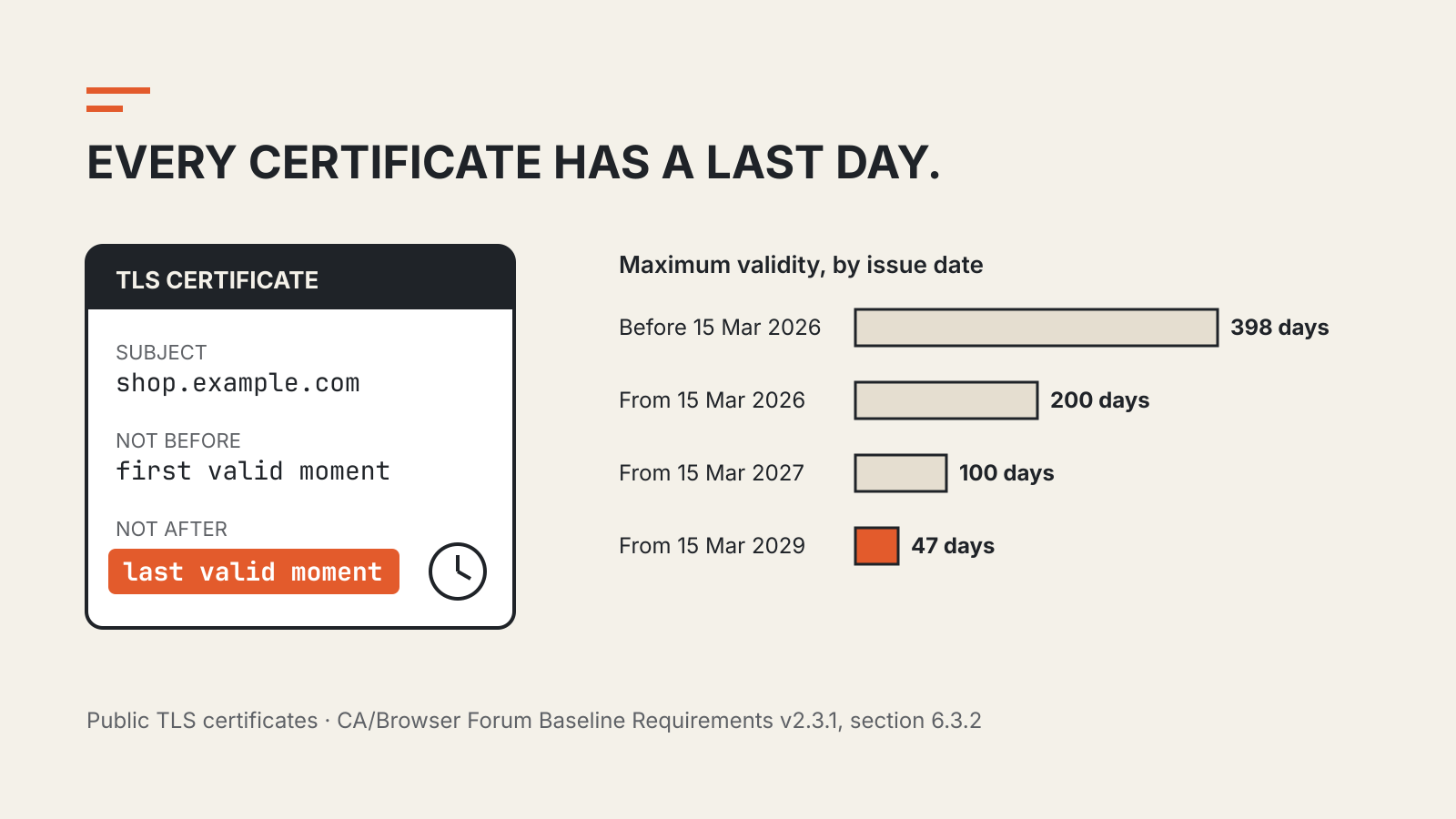
Every public TLS certificate carries two timestamps. notBefore marks the first moment it is valid and notAfter the last. The CA/Browser Forum’s Baseline Requirements, the rulebook that publicly trusted certificate authorities follow, define the validity period as the span from notBefore through notAfter, inclusive, and call notAfter the expiry date.
A browser checks those dates against the device clock on every new connection. Outside the window, the certificate is not accepted, no matter how strong its key or how reputable its issuer. That is why a device with a badly wrong clock can also report certificate errors on sites that are perfectly healthy.
Expiry is not a fault in the certificate. It is the design. A certificate vouches for facts that were checked at a point in time: that the requester controlled the domain, and for some certificate types, details about the organization. The Forum’s ballot SC-081v3 argues that the longer a certificate lives, the more likely those facts have drifted from reality.
Why expiry still causes outages
Renewal is a routine task that becomes dangerous precisely because it is rare. With a one-year certificate, the person who installed it may have moved on, the renewal reminder may go to an unread mailbox and the server where the certificate lives may not be the only place it was copied to.
Common failure points include:
- Certificates copied to several places. The same certificate may sit on a load balancer, a CDN, an origin server and a mail gateway. Renewing one copy leaves the others to expire.
- Automation that silently stopped. A renewal job can fail because a DNS record changed, a firewall blocked the validation request or an API credential expired.
- Reminder emails that no longer arrive. Let’s Encrypt ended its expiration notification emails on June 4, 2025, citing widespread automation, privacy and cost. Teams that relied on those messages need their own monitoring.
- Clients that pin or bundle certificates. Devices and apps that embed a specific certificate or intermediate can fail when the server switches to a new one, even if the new certificate is valid.
Our outages tracker collects major incidents from providers’ own post-incident reports; when reading one, check whether an expired or mismanaged certificate was the trigger or only a symptom.
Expired is not the same as revoked
An expired certificate reached the end of its planned life. A revoked certificate was withdrawn before that date by the authority that issued it.
The Baseline Requirements list when a certificate authority must revoke. Within 24 hours, for example, when the subscriber asks in writing, when the CA obtains evidence that the private key was compromised, or when domain validation can no longer be relied on. A second list, covering cases such as misuse, inaccurate information or certificates not issued according to the rules, allows up to five days.
For a site owner, both outcomes call for a replacement certificate. The difference is planning: expiry can be predicted to the second, while revocation can arrive at short notice after an incident, a compliance finding or a problem at the CA. A distrusted root is a larger version of the same problem; our report on the eMudhra certificate compromise shows how a browser decision can force replacements across many sites.
Certificate lifetimes are getting shorter
In April 2025 the CA/Browser Forum adopted ballot SC-081v3. Its record shows all four certificate consumers that voted, Apple, Google, Microsoft and Mozilla, in favor, along with 25 certificate issuers, with five abstentions and no votes against. The ballot added a schedule to section 6.3.2 of the Baseline Requirements:
| Certificate issued | Maximum validity |
|---|---|
| Before March 15, 2026 | 398 days |
| From March 15, 2026 | 200 days |
| From March 15, 2027 | 100 days |
| From March 15, 2029 | 47 days |
The same ballot shortens how long a CA may reuse a previous domain-control check, ending at 10 days from March 15, 2029. In practice, domain owners will have to prove control far more often.
Individual authorities may move faster. Let’s Encrypt, which already issues 90-day certificates, plans to reach 45 days: its default profile is scheduled to switch to 64-day certificates on February 10, 2027 and to 45-day certificates on February 16, 2028, with an opt-in 45-day profile available from May 13, 2026.
Shorter lifetimes reduce the time a stolen key or outdated certificate stays usable. They also remove the option of renewing by hand once a year. At 47 days, a manual process is no longer a realistic plan.
How to keep a certificate from expiring
Inventory every endpoint. List each hostname, where its certificate is served, who owns it and how it renews. Include internal services and partner-facing APIs, not only the public website.
Automate issuance and deployment. The ACME protocol lets software request, validate and install certificates without a person in the loop. Let’s Encrypt recommends that clients use ACME Renewal Information (ARI), which tells a client when to renew, or renew at about two thirds of a certificate’s lifetime rather than on a fixed 60-day timer.
Monitor the live certificate, not the renewal job. A job can report success while a stale copy is still served from a CDN edge or a second load balancer. External checks that connect to each hostname and read the presented expiry date catch that gap.
Practice replacement. Revocation and distrust events give little notice. A team that can swap a certificate in minutes, across every location it is deployed, handles both expiry and revocation the same way.