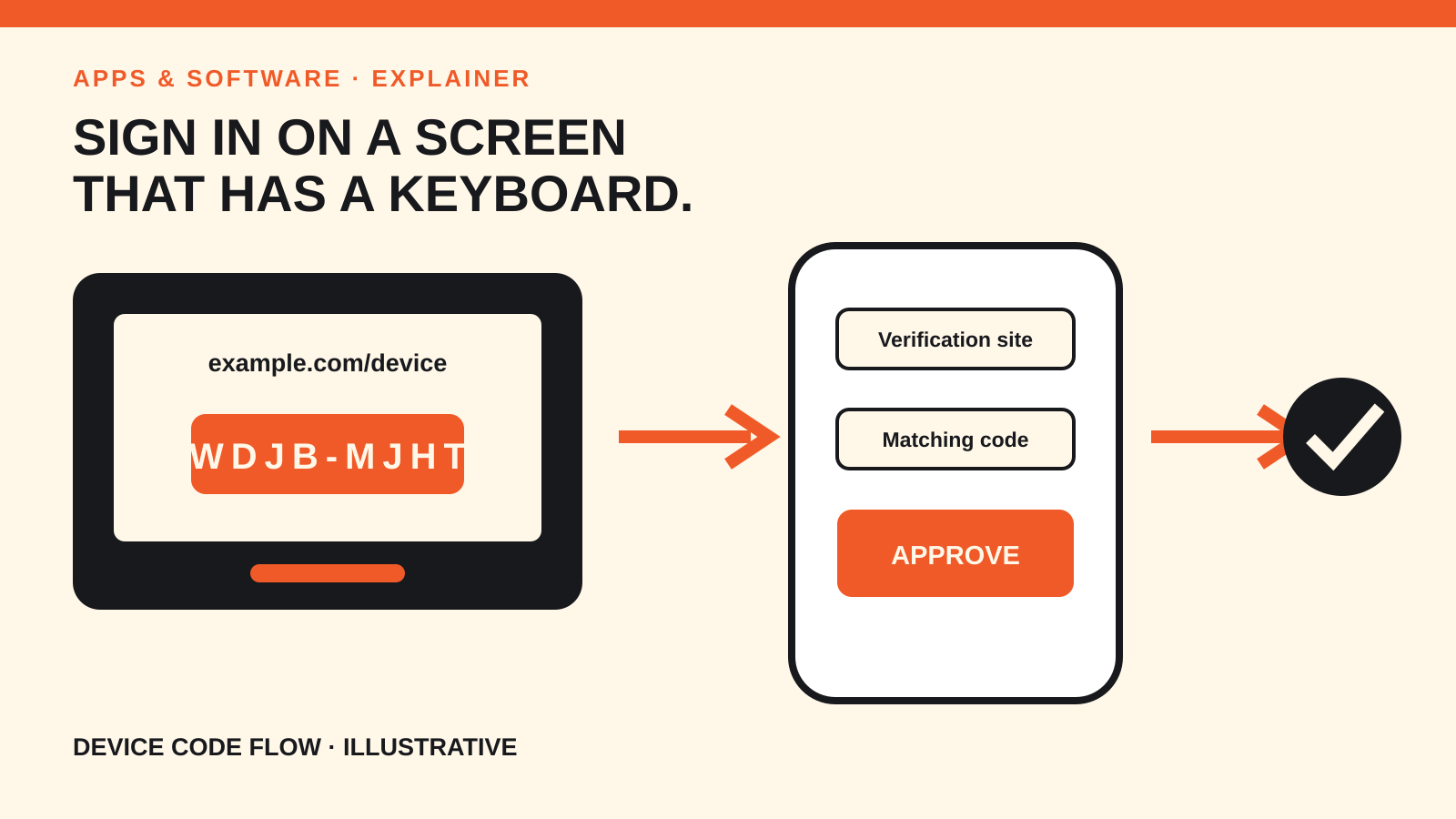
Device code flow is an OAuth sign-in method for devices that cannot offer a comfortable browser or keyboard. A TV, console or printer shows a short URL and code; you complete the approval on a phone or computer, while the original device waits for the result.
The problem it solves
Typing a long password with a remote control is slow and error-prone. Some devices also lack a full browser or cannot safely receive a normal redirect after sign-in.
OAuth 2.0 Device Authorization Grant, standardised in RFC 8628, separates the two jobs. The limited device starts the request and displays instructions. A second device — one with a browser and keyboard — handles authentication and consent.
This is not the same as entering your account password into the TV. The TV receives an access token only after the authorization server confirms that the user approved that specific request.
The flow in six steps
- The device asks for codes. It sends its client identifier and requested scope to the authorization server’s device endpoint.
- The server returns two codes. The private
device_codeis for the device. The shorteruser_codeis for the person. - The screen shows a URL and code. RFC 8628 calls the address the
verification_uri. A server may also supply a complete URI for a QR code or similar shortcut. - You open the URL elsewhere. On your phone or computer, you authenticate directly with the service and confirm the displayed code.
- You approve or deny the device. A responsible consent screen identifies what is requesting access and what permissions it wants.
- The device polls for the result. It checks the token endpoint at the server’s required interval. Approval returns a token; denial or expiry ends the attempt.
The polling interval matters. RFC 8628 says the server can answer authorization_pending while you are still deciding, or slow_down when the client must wait longer between checks.
What the two codes do
| Value | Seen by | Purpose |
|---|---|---|
user_code | You | Links the browser approval to the device in front of you |
device_code | The device and authorization server | Identifies the pending request during polling |
verification_uri | You | Opens the legitimate service page for authentication |
expires_in | Device logic | Ends an unfinished request after a limited time |
interval | Device logic | Sets the minimum delay between token checks |
A QR code can carry the complete verification URI, but RFC 8628 still requires the client to display the user code. The authorization page should show the code again so you can compare it with the screen.
The security check users should not skip
A device code can be abused for remote phishing. An attacker can start a sign-in on a device they control, then ask someone else to visit a legitimate verification page and enter the attacker’s code. The victim sees a real website but may approve the wrong device.
Use three checks:
- Start the process yourself on the device you intend to sign in.
- Type or scan only the address shown by that device, then verify the domain.
- Match the code and device description before approving.
Do not enter a code that arrived unexpectedly by email, chat or phone. A legitimate verification domain does not prove that the request belongs to your device.
These checks complement, rather than replace, account protection. Our comparison of two-factor authentication methods explains what happens at the login layer, while browser extension permissions covers a different way a trusted browser can be exposed.
What developers need to get right
Device clients are usually public clients: software embedded in a consumer device cannot reliably keep a static client secret. RFC 8628 therefore treats impersonation, code brute forcing, polling behaviour and token protection as design concerns.
An implementation should:
- make user codes short enough to enter but hard enough to guess;
- rate-limit attempts at the verification endpoint;
- honour
interval,authorization_pendingandslow_down; - use short expiration windows;
- display enough device information for the user to spot a mismatch; and
- request only the scopes the device needs.
RFC 9700, the OAuth 2.0 Security Best Current Practice published in January 2025, is the broader companion for current OAuth deployments. It deprecates weaker patterns and documents attacks that implementers should account for.
Where you will see this flow
Device authorization is useful for smart TVs, streaming boxes, consoles, printers and command-line tools. It is not automatically the best choice for every app. If the device can open a secure system browser and handle a redirect, another OAuth flow may give a smoother and more direct user experience.
The giveaway is the handoff: a screen with a short code, a separate browser, an approval page and a waiting device. That sequence is deliberate, not a workaround.