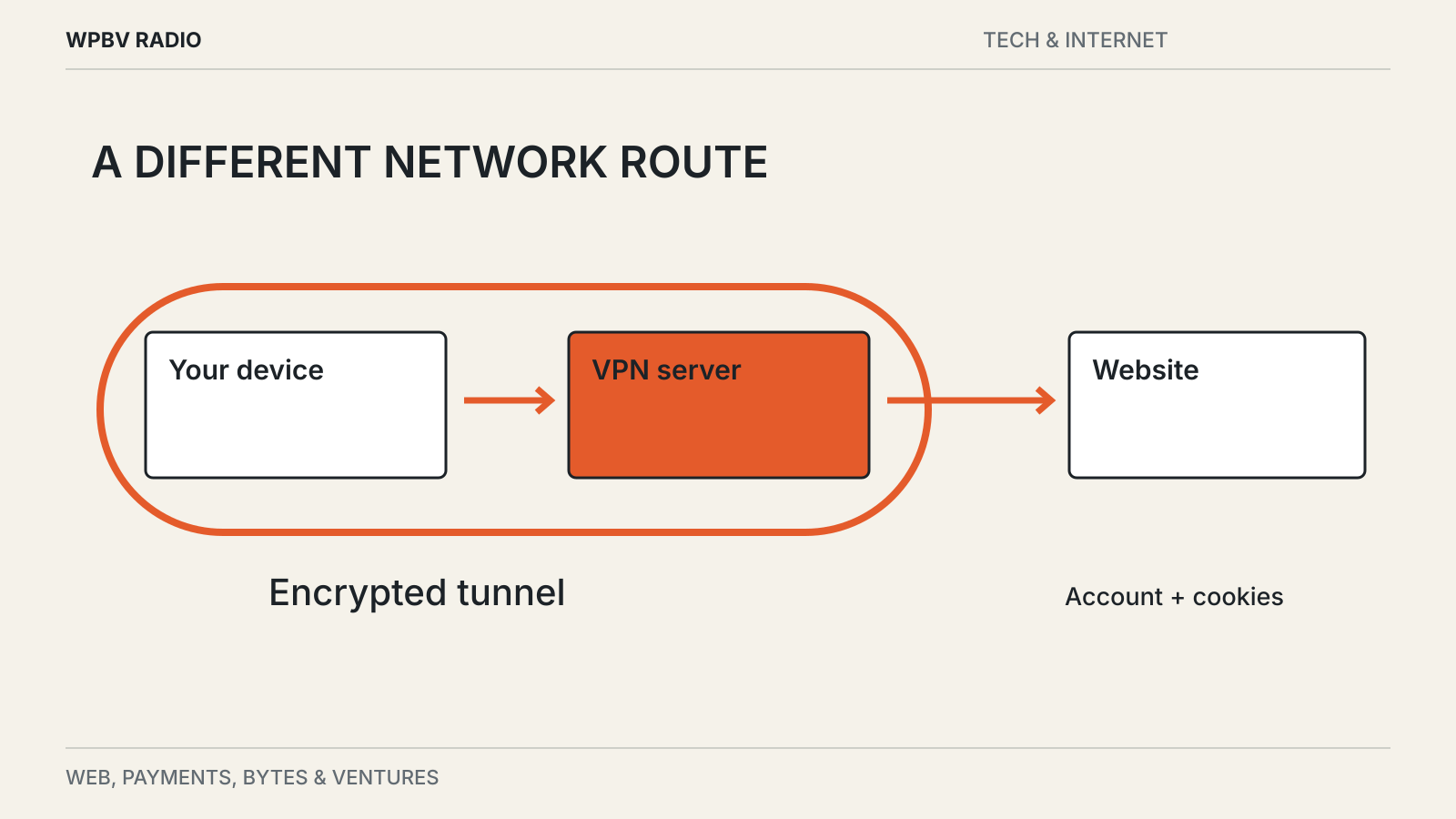
Switch on a VPN and a website sees a different public IP address. That is a real change. The website can still recognize the account you have just signed into.
A VPN routes covered traffic through another network over an encrypted connection between your device and the VPN server. It changes the network path and some of the information visible along it. It does not make every other identifier disappear.
Separate the local network from the website
Without a VPN, your internet provider and local network can observe information about your connection, although encryption limits what they can read. With a correctly configured VPN, covered traffic travels through a tunnel to the VPN provider.
The local network can generally see that you are communicating with a VPN endpoint, along with timing and traffic volume. The destination website generally sees the VPN’s public address rather than your direct connection’s address.
The Electronic Frontier Foundation’s VPN guide explains this shift in visibility and warns against claims of complete anonymity. The exact details depend on configuration, traffic outside the tunnel and the protocols involved.
HTTPS still matters inside the tunnel
HTTPS encrypts communication between your browser and a website. A VPN is a separate layer, covering the path from your device to its server.
The VPN provider does not automatically gain the ability to read correctly protected HTTPS page contents, passwords or messages simply because traffic passes through it. It may still observe connection metadata, such as destinations and timing, depending on the protocols in use.
Likewise, a VPN does not turn an unencrypted destination into an encrypted one after traffic leaves the tunnel. Keep HTTPS enabled and avoid treating the VPN icon as a substitute for a secure connection to the actual service.
Your browser and accounts remain recognizable
Cookies, account logins, browser characteristics and information you submit can identify you independently of your IP address. An app may also receive location information if you grant it permission.
Signing into the same account through a VPN tells the service which account is present. Changing servers does not erase its existing records. A private browsing window changes local browser storage behavior, but that too is a different function from network routing.
Before choosing a privacy tool, identify the observer you want to limit. A hotel network, an advertising tracker, a website account and an employer-managed device have different visibility. No single switch addresses all of them.
A provider becomes part of the trust decision
A commercial VPN is another organization handling your traffic. Read its explanation of data collection, retention, ownership and independent audits.
An audit can provide useful evidence about a defined system at a point in time. It is not a permanent guarantee about every app version or business practice. A promise of “no logs” also needs a definition: connection records, diagnostic events and account billing data are different categories.
The EFF guide suggests examining claims and business models rather than relying on a ranked list. That is especially useful when a review earns money from subscriptions.
Use it for a specific job
A VPN can be useful for reaching an authorized private network or reducing exposure to a local network you do not trust. Some people also use one to change their apparent network location, although services may restrict or block that traffic.
It will not repair a compromised device, recognize every phishing page or undo information voluntarily submitted to an account. Software updates, strong account protection and sensible permissions remain separate tasks.
For an example of those account protections, see our passkey guide. It addresses a different problem: proving account access without typing a reusable password into every login page.